1.10.2
A bug-fix version preventing error "Please choose destination forum" when quick thread is used in a forum. * Bug-fix: Message please choose destination forum when there is no forum selector
XenForo 1.x Add-Ons
Quick thread field on top of thread list with configurable messages. Inspired by XenForo 2.x implementation of Thread Prompts with some additional features.
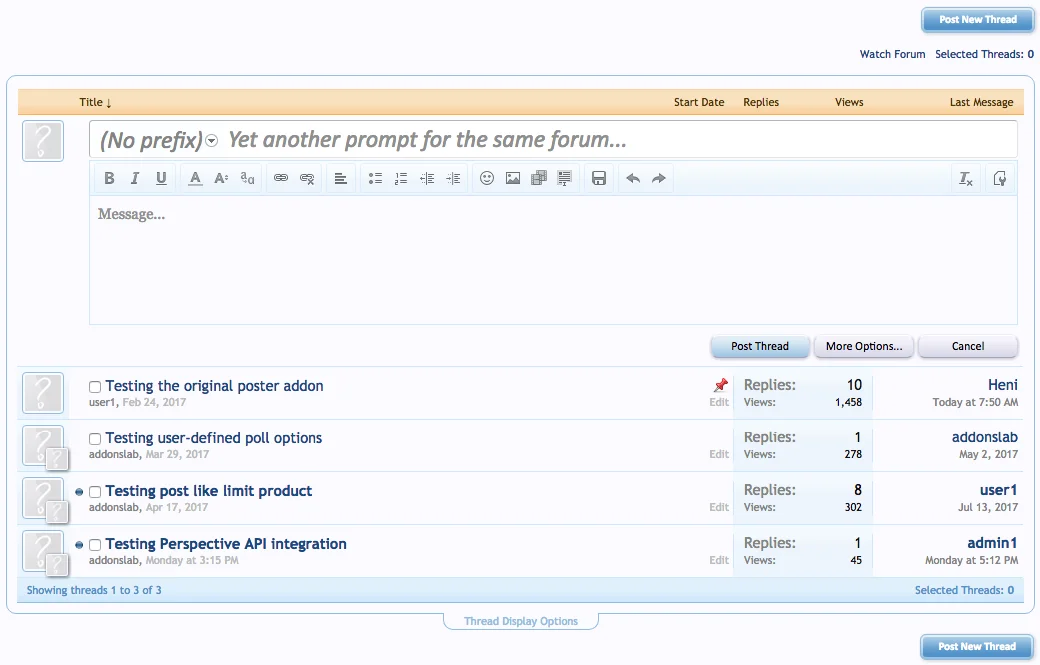
The add-on allows users to quickly post a thread in any forum. The interface and functionality are inspired by Thread Prompt available in XenForo 2.x versions.
You can find the most of the features from XenForo 2.x available in this add-on, such as:
Admin Panel page to create thread prompts and assign them to different forums.
Multiple prompts can be created for the same forum, in which case one of them is displayed randomly on each page load.
Threads are posted without reloading the page and appear in thread list immediately after posting.
Quick Thread editor is loaded via AJAX only when user starts typing in the subject field, so the editor does not slow down the page otherwise.
More options button to go to the full Create Thread page with all options available there.
Cancel button to close the editor and cancel the post.
Draft support with auto-saving message information between pages of the same forum.
Support guest posting if usergroup permissions allow the guests to post a thread
Support for Human Verification system if enabled.
Support for forums with minimum number of required tags
Similar Threads suggesting using the add-on https://xenforo.com/community/resources/similar-threads.2441/
Allow selection of thread prompts in Edit Forum page.
Quick setup page to assign multiple threads prompts to several forums at once.
We offer seven days free trial version on our website. No credit card is required, the service is approved automatically upon registration and confirmation of order.
IonCube Loader is required to run trial version of the product. The full version does not have such requirement and does not have any encoded code in it.
The product is active on our forums at https://addonslab.com/forums/ and can be tested at https://addonslab.com/forums/test-forum.3/
Registered user accounts
Username: user1 Password: userpass
Username: user2 Password: userpass
Admin account Username: admin1 Password: adminpass
You will get a License Key upon purchase/trial subscription, which will be available in My Services page at https://customers.addonslab.com/marketplace.php/my-services/
The key should be entered in product's Options page in XenForo Admin Panel. Once entered and saved you will see full details about your current license status. The key can be used only on one board and one server, so if you move the board you need to Reissue the license in My Services page.
The product does not include any callbacks, that execute on page load time on front-end or via cron jobs. License check is done only when you edit/save product's options or upgrade the product to the next version.
We require valid XenForo license to purchase the product. You will be asked for XenForo License validation information during the purchase.
Full details at https://addonslab.com/threads/product-licensing-information.81/
Support will be provided in the Discussion Thread at XenForo.com and in our Support System at https://customers.addonslab.com/submitticket.php
Feel free to contact us with any issues you find in the product or any suggestions.
Check out our free and paid XenForo add-ons in our Marketplace at https://customers.addonslab.com/marketplace.php
A bug-fix version preventing error "Please choose destination forum" when quick thread is used in a forum. * Bug-fix: Message please choose destination forum when there is no forum selector
A bug-fix version preventing an error logged in browser's console when the target forum is changed. * Bug-fix: prevent an error logged in browser's console when the target forum is changed
In this version, we have modified the behavior of the product not to select any of the available forums by default when a thread prompt is associated with multiple forums on the home page. As a result, users have to select one of the forums before submitting the thread. This way admins will avoid having unrelated threads being posted in a forum if users and don't change the forum and automatically submit the thread to the first forum in the list. * Usability improvement - no forum selected by default
The version fixes the support for Similar Threads add-on which was broken since last update. Bug-fix: Similar Threads not showing
This version introduces support for Widget Framework and direct template modification to embed the quick thread widget. The update targets the cases when the customer builds a custom "home page" with widgets or custom template and wants Quick Thread form there, which, however, would not work as variables needed for the form to render would be missing. In this version, the variables required will be available in all XenForo templates. The same time, the variables will be generated and stored in memory only if they are accessed, so the enhancement has no performance impact on pages which don't use the Quick Thread form at all. To embed the form anywhere in your templates all you need is just to include the template alqt_thread_placeholder_stand_alone. * New feature: Widget framework and custom template location support
Sign in — reviews are written by customers who bought this product.
Be the first to review Quick Thread.